

Key Takeaways
No setup required - tracking runs automatically
Both iOS and Android activate basic usage tracking at the OS level without any additional app install or account creation, lowering the barrier to getting started.
Surfaces habits that are otherwise invisible
Most people significantly underestimate their daily pickup count and per-app usage; seeing concrete numbers - even rough ones - creates a factual starting point for reflection.
Built-in app limits and downtime scheduling
Users can set daily time caps per app or category and schedule device downtime windows, adding lightweight friction to habitual or unintentional use.
Notification auditing helps reduce interruptions
Both platforms show which apps are sending the most notifications, making it straightforward to identify and silence sources of frequent interruption.
No additional cost above the device itself
These tools are included in the operating system and do not require a subscription, making them accessible to anyone with a compatible device.
Only tracks one device at a time
Time spent on laptops, tablets, smart TVs, or gaming consoles is not captured unless each device has its own tracking enabled - and there is no unified cross-device dashboard in either platform.
Cannot distinguish active use from passive background play
A podcast or video playing in the background counts identically to focused, engaged use - the tools measure screen-on time in an app, not meaningful engagement.
Browser usage is tracked by browser, not by site
Time inside Chrome or Safari registers as a single total; the tools do not break down which websites you visited or for how long, limiting their usefulness for web habit analysis.
App limits are easy to override
Both platforms allow users to dismiss or extend time limits with a single tap, meaning the controls function as gentle nudges rather than hard stops.
No context or intent data
The data cannot differentiate between productive use - reading, navigating, banking - and mindless scrolling, so raw totals can feel misleading without manual interpretation.
Parental controls have platform-specific gaps
On some Android devices, Digital Wellbeing restrictions can be bypassed by accessing apps through the file manager or alternate launchers, reducing their reliability as a parental tool.
Our Verdict
Built-in screen time tools are a genuinely useful starting point for anyone who wants a rough picture of their digital habits. They surface data that would otherwise be invisible - but they measure device activity, not attention or context, and their cross-platform gaps mean the full picture always requires some interpretation.
Most useful for people who want a low-effort, no-cost baseline of their smartphone habits, or parents seeking basic usage visibility on a child's single device.
What Built-In Screen Time Tools Actually Measure
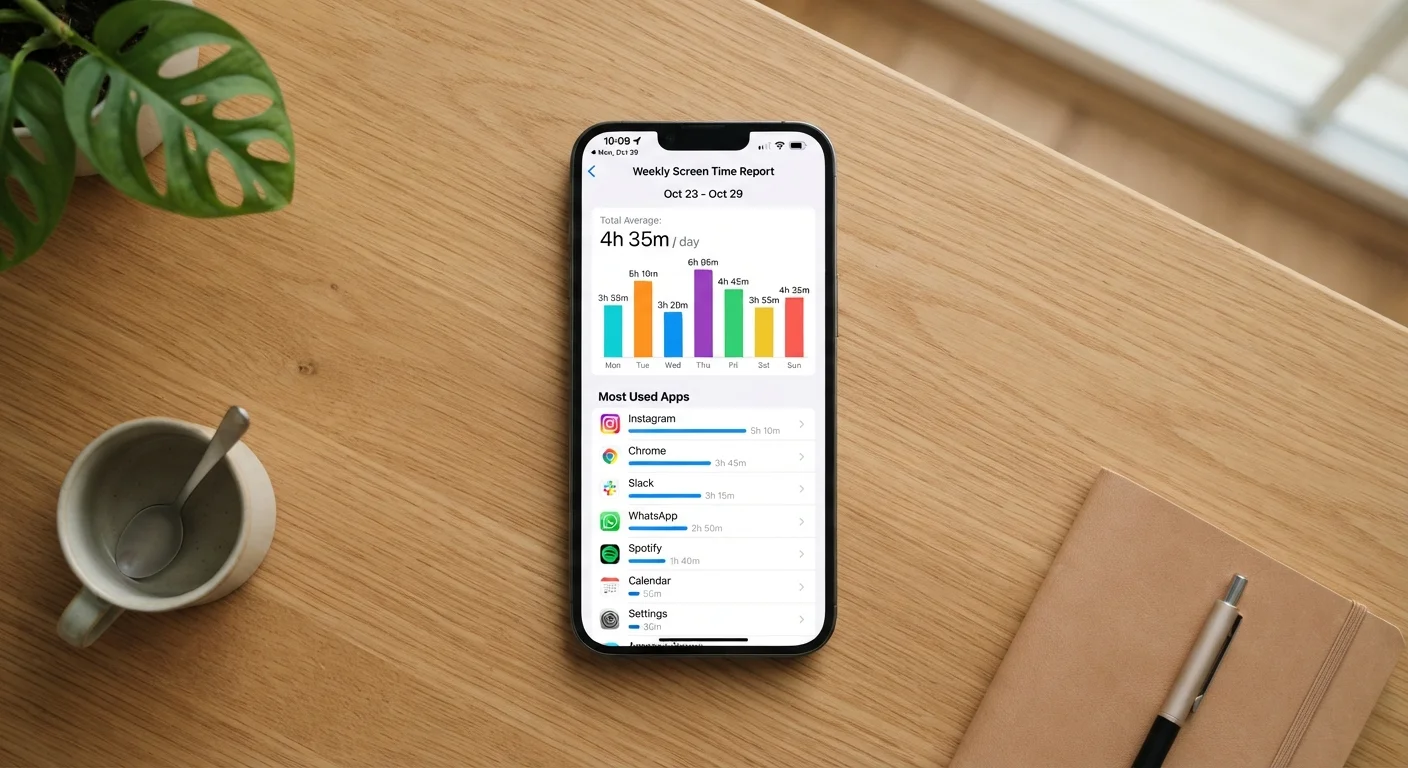
Apple's Screen Time (iOS/iPadOS/macOS) and Google's Digital Wellbeing (Android) are the two dominant built-in platforms for tracking how you spend time on your devices. Both tools log similar categories of data: total time spent in each app, how many times you pick up your device, how many notifications arrive and from which apps, and - in Apple's case - a breakdown by content category such as Social or Entertainment.
The data is collected at the operating system level, which means it runs automatically without requiring any extra app or manual input. Weekly summary reports are pushed to users, and both platforms let you drill down by day or app. For many people, this is the first time they've seen a number attached to habits that previously felt vague.
Screen Time Data and Personal Wellbeing
Screen time dashboards measure quantity of use, not quality or impact. Whether a given amount of phone use is a problem depends heavily on context, purpose, and individual circumstances - factors the tools cannot assess. This article is for informational purposes only and does not constitute medical or psychological advice. If you have concerns about your relationship with technology, speaking with a qualified healthcare professional is a reasonable next step.
These dashboards can be a useful complement to broader thinking about tech habits. For a look at the research behind phone use and wellbeing, see what the evidence actually says about phones and mental wellness.
The Real Advantages of Tracking Screen Time
The strongest argument for using these tools is simply that they make invisible behavior visible. Most people consistently underestimate how often they pick up their phone or how much cumulative time they spend in a given app. Seeing a concrete number - even an imprecise one - can prompt genuine reflection.
No setup required - tracking runs automatically
Both iOS and Android activate basic usage tracking at the OS level without any additional app install or account creation, lowering the barrier to getting started.
Surfaces habits that are otherwise invisible
Most people significantly underestimate their daily pickup count and per-app usage; seeing concrete numbers - even rough ones - creates a factual starting point for reflection.
Built-in app limits and downtime scheduling
Users can set daily time caps per app or category and schedule device downtime windows, adding lightweight friction to habitual or unintentional use.
Notification auditing helps reduce interruptions
Both platforms show which apps are sending the most notifications, making it straightforward to identify and silence sources of frequent interruption.
No additional cost above the device itself
These tools are included in the operating system and do not require a subscription, making them accessible to anyone with a compatible device.
The tools also integrate with practical controls. Both platforms allow users to set daily app limits, schedule downtime windows, and - for family accounts - apply usage restrictions across a child's device. For families managing a child's first smartphone, these features provide a starting point, even if they aren't foolproof. Family plans and shared accounts add another layer of context worth understanding before relying on these controls.
Where Screen Time Tools Fall Short
The limitations are significant enough to matter. The most structural gap: these tools only track the device they live on. If you move from your phone to a tablet, laptop, or smart TV, that time is invisible unless each device has its own tracking configured - and even then, there's no single consolidated view across all of them.
Only tracks one device at a time
Time spent on laptops, tablets, smart TVs, or gaming consoles is not captured unless each device has its own tracking enabled - and there is no unified cross-device dashboard in either platform.
Cannot distinguish active use from passive background play
A podcast or video playing in the background counts identically to focused, engaged use - the tools measure screen-on time in an app, not meaningful engagement.
Browser usage is tracked by browser, not by site
Time inside Chrome or Safari registers as a single total; the tools do not break down which websites you visited or for how long, limiting their usefulness for web habit analysis.
App limits are easy to override
Both platforms allow users to dismiss or extend time limits with a single tap, meaning the controls function as gentle nudges rather than hard stops.
No context or intent data
The data cannot differentiate between productive use - reading, navigating, banking - and mindless scrolling, so raw totals can feel misleading without manual interpretation.
Parental controls have platform-specific gaps
On some Android devices, Digital Wellbeing restrictions can be bypassed by accessing apps through the file manager or alternate launchers, reducing their reliability as a parental tool.
1 device
Scope of built-in screen time tracking
Built-in tools on iOS and Android are designed to track the single device they're installed on - cross-device aggregation is not a native feature of either platform.
~4-5 hrs
Average daily U.S. smartphone screen time
Industry research firms tracking mobile usage have consistently reported average daily smartphone screen time in this range among American adults, though figures vary by methodology and age group.
Context is another missing layer. The tools cannot distinguish between a focused 45-minute reading session in a book app and 45 distracted minutes cycling through social feeds. Both log identically. Passive video playback is similarly blunt - the app counts regardless of whether you were watching closely or had the screen on in the background.
It's also worth noting that the tools track app-level activity, not browser tab-level. An hour spent across several websites inside Safari or Chrome registers simply as time in the browser, not time on specific sites - unless you're using a third-party parental control tool. For anyone concerned about app permissions more broadly, it's worth understanding what permissions these apps actually access.
How to Use the Data Without Over-Relying on It
The most practical approach is to treat screen time reports as a directional signal, not a verdict. If your weekly total creeps up significantly from the prior week, that's worth noticing - even if the exact number is imprecise. If a category you didn't expect shows high usage, that's a prompt to investigate, not a conclusion.
Setting limits through these tools works best when the goal is creating friction rather than enforcing strict caps. A five-minute warning before an app limit kicks in is a nudge; a determined user can bypass it in seconds. The same is true for parental controls - they work best alongside ongoing conversations, not as a substitute for them.
If you're drawn to the idea of tracking behavior across multiple areas of life - not just screen time - the trade-offs between analog and digital approaches are consistent across contexts. The paper vs. app debate in budgeting surfaces many of the same questions about what automated tracking captures and what it misses. Before adding any third-party screen time app to fill the gaps, run through a basic install checklist - some of these apps request extensive access to your device.