

Key Takeaways
Download vs. Upload Speed
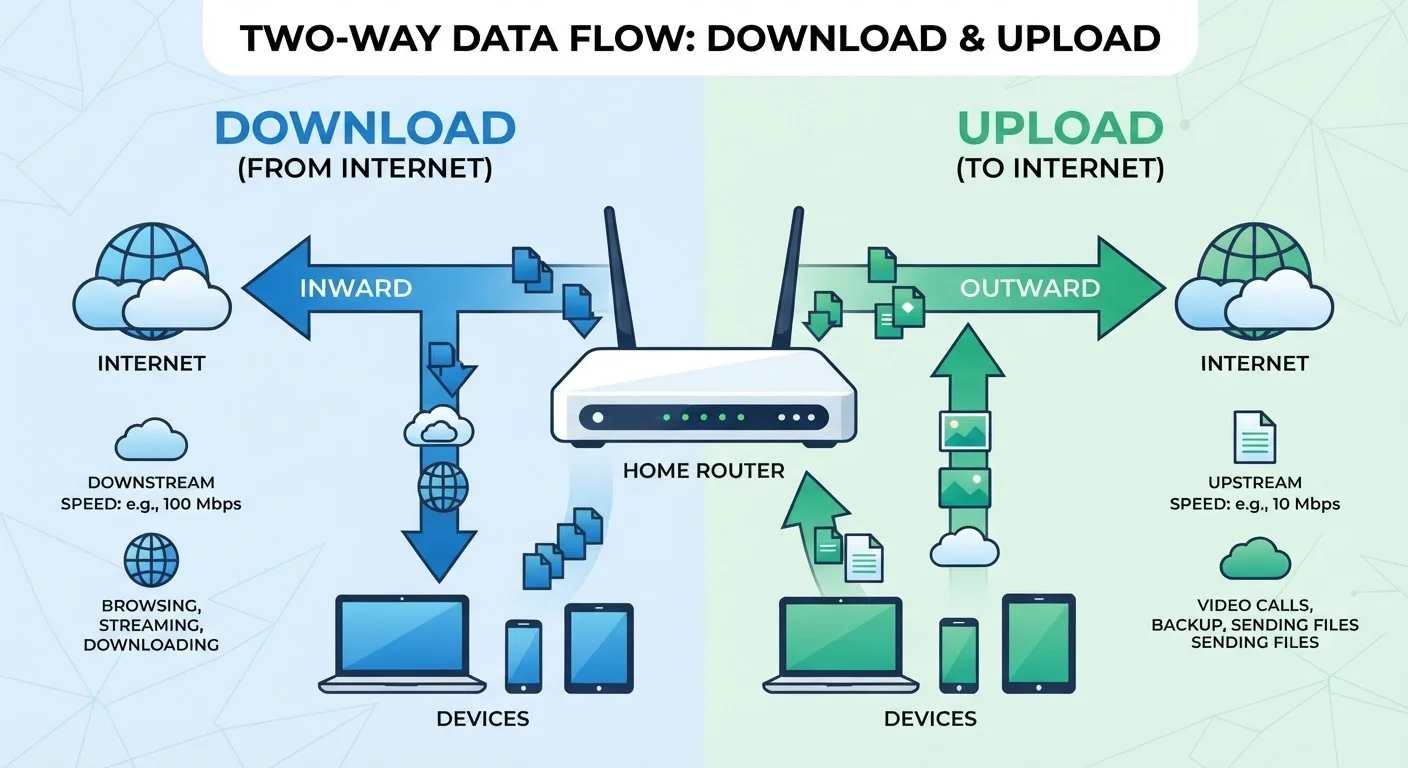
Download speed measures how fast your internet connection pulls data from the internet to your device - think loading a webpage or streaming a movie. Upload speed measures how fast your connection sends data from your device to the internet - think video calls, sending large files, or posting content online. Both are measured in megabits per second (Mbps).
Most residential internet technologies, including cable and DSL, are asymmetric by design - meaning upload capacity is intentionally smaller than download capacity. Fiber connections are more likely to offer symmetric (equal) speeds.
What Each Number Actually Measures
When an ISP advertises a plan, the featured speed - say, "300 Mbps" - almost always refers to download speed. That's the rate at which data travels from a server on the internet to your device. Loading a news article, streaming a show, downloading a software update: all of these are download activities.
Upload speed works in the opposite direction. It's the rate at which data travels from your device outward to the internet. Sending an email attachment, joining a video call, backing up photos to cloud storage, or live streaming - these are all upload activities. The two numbers describe the same connection, but they govern entirely different tasks.
For a broader look at how internet connections are categorized and what the terminology means, see our home internet explainer.
~10-20 Mbps
Typical upload speed on cable internet plans
While download speeds on cable plans routinely reach hundreds of Mbps, upload allocations often remain in the 10-20 Mbps range, according to published plan disclosures from major U.S. cable providers.
5 Mbps
Minimum upload speed for HD video calls
Major video conferencing platforms generally recommend at least 3-5 Mbps upload per participant for high-definition calls, per their publicly published system requirements.
25 Mbps / 3 Mbps
FCC's prior baseline definition of broadband
The FCC long defined broadband as 25 Mbps download and 3 Mbps upload - a threshold widely criticized as inadequate for modern multi-person households, and since updated to 100 Mbps / 20 Mbps.
Why Plans Are Designed Asymmetrically
Cable and DSL connections - still the most common home internet types in much of the U.S. - use shared infrastructure that was engineered decades ago around a one-directional content model: households receive data far more than they send it. That assumption made sense in the era of browsing static web pages. ISPs structured their plans accordingly, dedicating far more bandwidth to downloads than uploads.
The result is asymmetric service. A cable plan might offer 500 Mbps download but only 20 Mbps upload. The download figure gets the marketing spotlight; the upload figure appears in a footnote. Fiber internet changed this calculus for many providers - fiber's physical properties make symmetric speeds much easier to deliver - but asymmetric fiber plans still exist, so reading the fine print matters.
Check Both Figures Before Signing Up
ISP plan pages are required to disclose upload speeds, but they're often listed in smaller text or a secondary spec table. Before committing to a plan, locate the upload figure explicitly - don't assume it scales proportionally with the download speed. Some plans offer 1 Gbps download alongside only 35 Mbps upload.
Where Upload Speed Shapes Your Daily Experience
The shift toward remote work and video communication has made upload speed a practical concern for millions of households that previously never thought about it. Here's where the impact is most direct:
- Video calls: Platforms transmit your video and audio outbound continuously. A weak upload connection produces pixelation, frozen frames, and dropped audio - problems that your download speed cannot fix.
- Screen sharing and remote desktop tools: These send a constant stream of screen data to other participants, placing steady demand on upload bandwidth.
- Cloud backups: Services that automatically back up photos, documents, or device images push large volumes of data upward, often competing with other household tasks.
- Content creation: Uploading video files to a platform, publishing large image galleries, or syncing project files with a team all depend on upload capacity.
For households where streaming is the main use case, how streaming, downloading, and caching differ is worth understanding - streaming is largely a download activity, but upload matters the moment you switch from watching to participating.
Reading a Plan's Speed Figures Honestly
Advertised speeds represent theoretical maximums under ideal conditions - not what you'll reliably experience at 7 p.m. on a weeknight. Real-world performance depends on network congestion, the quality of your equipment, your home's wiring, and how your devices connect. Why your internet often feels slower than the plan you're paying for explains the gap in more detail.
When comparing plans, look for the upload speed listed alongside the download figure. A household with one or two remote workers may find that a lower-tier plan with strong upload performance serves them better than a higher download tier with a narrow upload lane. Similarly, common speed myths can lead people to pay for more download capacity than they need while overlooking the upload figure that actually limits them.
Also consider your connection method inside the home. A fast plan loses practical value if your devices connect over a congested Wi-Fi band. Wired versus Wi-Fi connections each have real trade-offs worth factoring into your setup.