

Key Takeaways
Option A
Fiber Internet
The newer, symmetrical-speed technology built for demanding households.
Best for: Households with multiple simultaneous users, remote workers who upload frequently, and anyone where latency consistency matters.
Option B
Cable Internet
The widely available, often fast-enough option built on existing cable TV infrastructure.
Best for: Households in areas without fiber access, or those who primarily download and stream rather than upload large files.
If you work from home and regularly upload large files or join video calls
Fiber Internet
Fiber's symmetrical upload speeds prevent the bottleneck that cable connections hit when uploading, keeping video calls stable and file transfers fast.
If fiber isn't available in your area yet
Cable Internet
Cable is widely deployed and can deliver download speeds sufficient for most household needs until fiber infrastructure reaches your neighborhood.
If your household has four or more devices streaming or gaming simultaneously
Fiber Internet
Fiber's dedicated connection and symmetrical bandwidth handle simultaneous high-demand usage without the congestion that can affect shared cable networks.
If you primarily stream video, browse, and do light downloading
Cable Internet
For download-centric activities, cable's higher download speeds are typically more than sufficient, and infrastructure is already in place in most U.S. cities.
How the Two Technologies Actually Work
The difference between fiber and cable internet isn't just marketing language - it's rooted in fundamentally different physical infrastructure. Understanding that helps explain why they behave so differently in a real home.
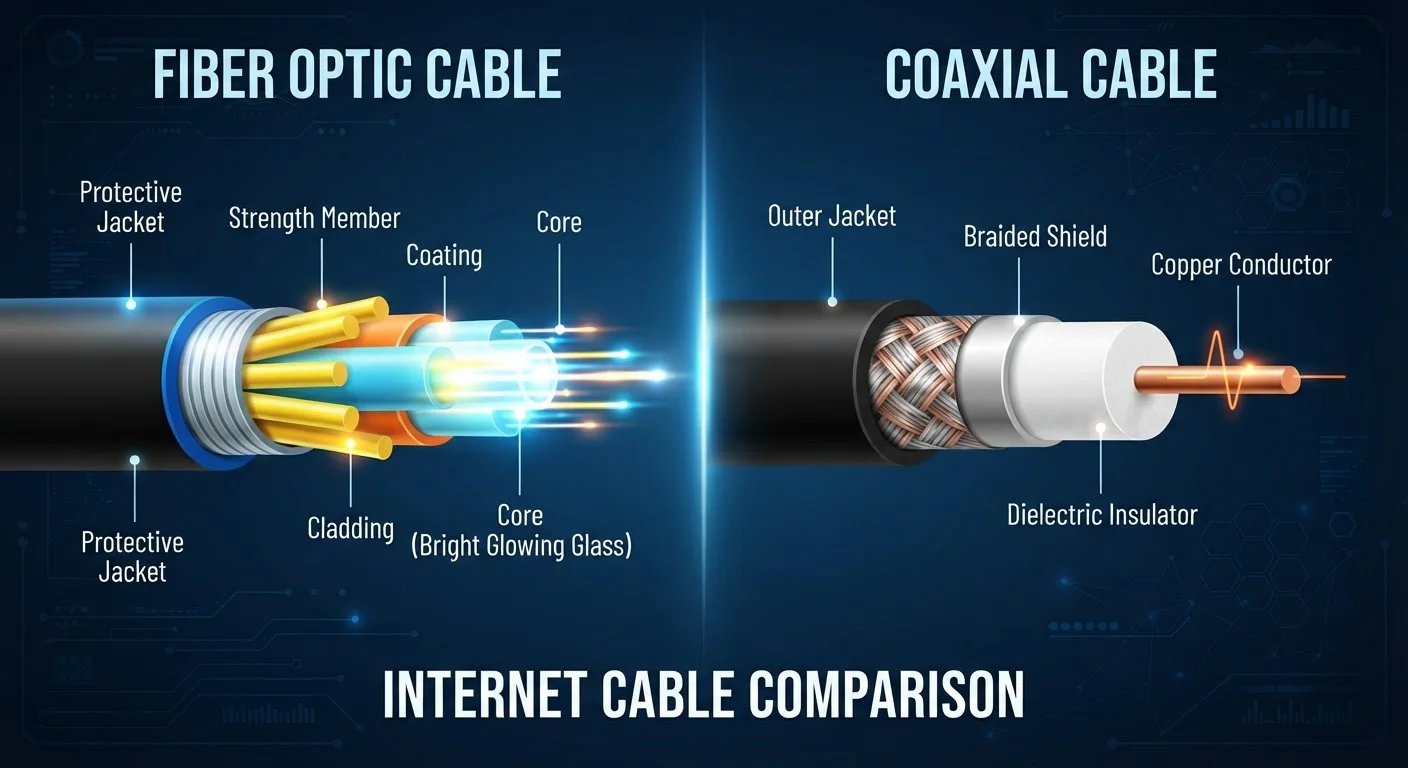
Fiber optic internet transmits data as pulses of light through thin strands of glass or plastic. Because light travels with minimal signal degradation over long distances, fiber connections maintain their speed and quality reliably from the provider's network all the way to your home - or very close to it. This is why you'll sometimes see terms like FTTH (Fiber to the Home) or FTTC (Fiber to the Curb) used to describe how far the fiber actually reaches.
Cable internet uses the same coaxial copper cable infrastructure that carries cable television signals. Data travels as electrical signals, and while providers have invested in technologies like DOCSIS (Data Over Cable Service Interface Specification) to push speeds higher, the medium has inherent physical limitations that fiber simply doesn't share. For a broader overview of connection types, see Home Internet Explained.
| Criterion | Fiber Internet | Cable Internet |
|---|---|---|
| Signal medium | Light through glass/plastic fiber | Electrical signal through coaxial copper |
| Upload vs. download speeds | Typically symmetrical | Upload significantly slower than download |
| Network sharing | Dedicated or low-contention architecture | Shared neighborhood node |
| Peak-hour consistency | Generally more consistent | Can slow during high-demand hours |
| Geographic availability | Expanding but still limited | Widely available across the U.S. |
| Infrastructure age | Modern, purpose-built for data | Repurposed from cable TV infrastructure |
The Shared Network Problem with Cable
One of the most practically important - and least advertised - differences between fiber and cable is how each handles neighborhood demand. Cable internet operates on a shared network node: your connection's available bandwidth is pooled with your neighbors'. During peak evening hours when many households are simultaneously streaming, gaming, or video calling, everyone on that node competes for capacity. Speeds can drop noticeably.
Fiber connections are point-to-point or use passive optical network architecture that allocates dedicated bandwidth per customer. This means a busy neighborhood generally has less impact on your fiber speeds than it would on a cable connection.
~43%
U.S. homes with fiber access
The FCC's Broadband Data Collection reports fiber availability reaching roughly 43% of U.S. housing units as of recent filings, compared to near-universal cable coverage.
10-30 Mbps
Typical cable upload speed on mid-tier plans
While cable download speeds regularly reach 300-1,000 Mbps on mid-tier plans, upload speeds on those same plans commonly range from 10 to 30 Mbps.
This doesn't mean cable is always slow - a well-maintained cable network with adequate node capacity can deliver consistent speeds for most households. But the congestion risk is structural, not something you can fix on your end. If you've noticed your connection slowing down after dinner, this is often the reason. For more on the gap between advertised and real-world speeds, see why your internet feels slower than your plan.
Upload Speed: Where Fiber Pulls Significantly Ahead
Most internet plans are designed around the assumption that households download far more than they upload - streaming a movie, loading a webpage, downloading a software update. Cable plans reflect this assumption with asymmetric speeds: a plan advertised as 500 Mbps download might offer only 20-30 Mbps upload.
Fiber plans are typically symmetrical, meaning the upload speed matches the download speed. A 500 Mbps fiber plan generally offers 500 Mbps in both directions.
For households where someone works from home, shares large files, uses cloud backup services, or streams their own content, that upload gap is a meaningful real-world limitation - not just a spec sheet footnote. Even video conferencing tools send and receive simultaneously, and a constrained upload can produce choppy video on your end regardless of how fast your downloads are. Common myths about internet speed covers why raw download numbers don't tell the whole story.
Availability and Practical Access
Fiber's technical advantages don't help if it isn't available where you live. Laying fiber-optic cable requires significant infrastructure investment, and buildout has prioritized urban and dense suburban areas. According to the Federal Communications Commission, fiber availability has been expanding but still lags behind cable in total geographic reach across the U.S., particularly in rural communities.
Cable infrastructure, on the other hand, was built out over decades alongside cable television and covers the vast majority of American homes. If you live outside a major metro area, cable may be your most practical wired option for the foreseeable future. For readers in areas with limited access, matching connection type to your location covers the full range of alternatives, including fixed wireless and satellite.
How to Check What's Actually Available at Your Address
ISP coverage maps are often optimistic, showing a ZIP code as served even when individual streets or buildings aren't yet connected. The most reliable approach is to enter your specific street address - not just your ZIP - on each provider's availability checker. The FCC's Broadband Map (broadbandmap.fcc.gov) also lets you search by address and see what providers have reported for your location, though self-reported data can have gaps.
The right connection type is ultimately shaped by what's actually available at your address - and that can vary even within the same ZIP code.